
Every week in Ireland, hundreds of laptops are stolen from business premises. Insurance reimburses the hardware, you buy a new device, and move on. That is exactly the reflex that turns a simple company laptop theft into a ticking time bomb for your data and GDPR compliance. This guide explains why this risk is systematically underestimated, what the law precisely requires, and how well-designed IT security for SMEs in Dublin anticipates it — before the theft, not after.
KEY FIGURE
Across the EU in 2025, SMEs, small enterprises and mid-caps made up close to half of ransomware victims (ENISA Threat Landscape, ANSSI Panorama 2025). The Data Protection Commission (DPC) in Ireland processes thousands of personal data breach notifications every year, with lost and stolen devices among the top recurring causes. Laptop theft is one of the most normalised entry points in those statistics.

What a business laptop actually contains
Ask yourself seriously: what does one of your colleagues’ laptops actually contain? Beyond the operating system and line-of-business applications, a modern workstation is an access concentrator to your entire information system. Here is the typical inventory we find during SME security audits:
Saved credentials
Passwords stored in the browser: email, ERP, SaaS tools, online banking, intranet. Often without MFA. An open session means a live access.
Local files
Quotes, contracts, client lists, accounting exports, HR files downloaded from a share. Many are never uploaded back to OneDrive or SharePoint.
GDPR personal data
Client contact details, HR records, prospect files, email history. All covered by GDPR as soon as they can identify a natural person.
Internal network access
VPN profile configured, 802.1X client certificate, stored corporate Wi-Fi keys, cloud authentication tokens. The laptop becomes an entry point to the whole IT environment.
An unencrypted computer is an open key to your entire information system. No hacking skills are needed: a bootable USB drive is enough, and all company data becomes accessible within minutes. This is the first reason why full-disk encryption (BitLocker on Windows, FileVault on macOS) is not optional — it is a prerequisite.

The 4 consequences SMEs systematically underestimate
The real impact of a laptop theft goes far beyond the cost of replacing the hardware. Here are the four consequences we see systematically downplayed among directors who haven’t yet experienced an incident.
CONSEQUENCE 1
72-hour DPC notification
If the laptop contained personal data — which is almost always the case — Article 33 of the GDPR requires notification to the Data Protection Commission (DPC) within 72 hours of becoming aware of the theft. Late notification must be justified. Where the breach is likely to result in a high risk, Article 34 also requires notifying each data subject individually.
CONSEQUENCE 2
Rebound into your internal network
If the laptop had an active VPN profile, client certificates or open cloud sessions, the thief — or a buyer on resale markets — can access your network weeks after the theft. A simple hardware theft becomes a prolonged intrusion, which is exactly the scenario attacker groups are increasingly favouring: data exfiltration now outpaces classic ransomware deployment.
CONSEQUENCE 3
Immediate operational impact
Reconfiguring a workstation from scratch takes 4 to 8 hours of work, often more if the device wasn’t documented. During that time, the employee can’t work. Data not backed up to the cloud is permanently lost. Multiplied across 2 or 3 colleagues, the incident can paralyse a whole department for two days.
CONSEQUENCE 4
Damage to client trust
If a client’s data is compromised, Article 34 of the GDPR requires notification. The trust relationship built over years can collapse in a single conversation. For a B2B SME in Dublin, this is often the most significant commercial risk — well beyond the administrative fine itself.
LEGAL OBLIGATION — GDPR
Article 83 §5 of the GDPR provides that, in the event of a failure to meet security (Article 32) or notification (Article 33) obligations, administrative fines may reach €20 million, or 4% of total worldwide annual turnover of the preceding financial year — whichever is higher. The DPC is one of the most active supervisory authorities in Europe, and has issued several multi-million-euro fines against large controllers. For SMEs, fines are proportionate — but the reputational cost and client-trust impact are often the real damage.
Source: Regulation (EU) 2016/679 of 27 April 2016 (GDPR), Articles 33, 34 and 83. DPC procedure: dataprotection.ie — Breach Notification.
Where it happens — the three high-risk situations
Company laptop theft rarely results from a sophisticated cyber attack. Three situations cover the vast majority of cases we see on the ground across Dublin and Ireland:
Unattended premises
Ground-floor open spaces, shared premises (coworking, business incubators), weekends or bank holidays. A forced window, an unidentified visitor, and the laptop is gone.
Company vehicles
The laptop left on the passenger seat over lunch, the bag visible in the boot. A broken window takes 5 seconds. Very frequent in business parks and peri-urban areas.
Public spaces
Café, train station, coworking space. A few seconds of inattention while paying, the bag moves, the laptop is gone. Very common in commercial mobility and among sole practitioners.
The answer is not purely organisational (awareness, rules). It is technical, and it must be prepared before the incident — not during it.
The 5 layers of protection to deploy before the theft
Effective IT security for SMEs against laptop theft rests on five layers that must be deployed together. None is sufficient on its own, but combined they reduce the impact of a theft to the cost of the hardware alone.
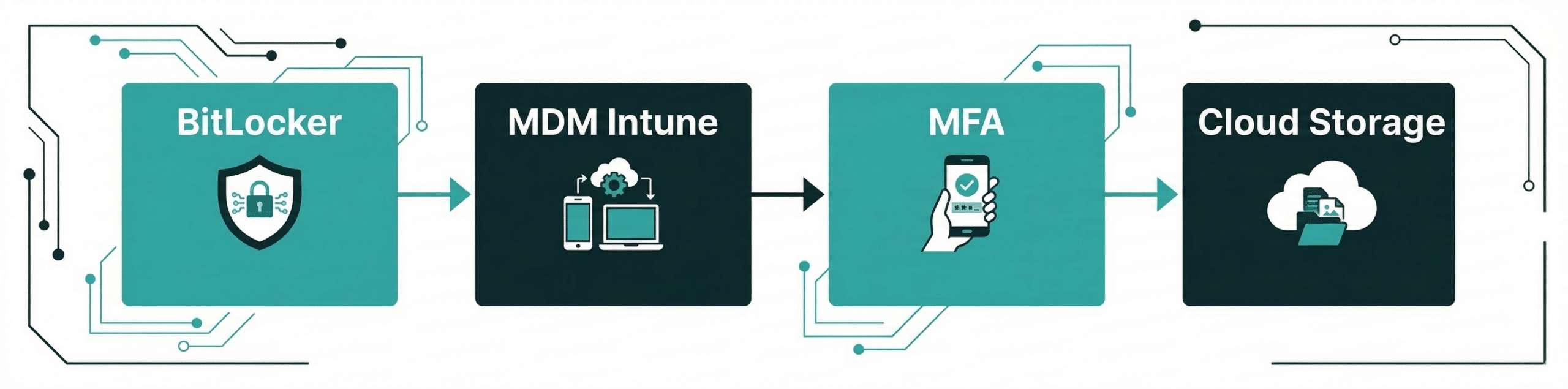
1. Full-disk encryption
BitLocker (Windows Pro / Enterprise, AES 128 or 256 bits, FIPS 140 certified) or FileVault (macOS, XTS-AES-128 with 256-bit key). Enable full-disk encryption. Even if the thief physically extracts the drive and plugs it into another machine, the contents remain unreadable without the key. Recovery key backup is critical — in Azure AD / Entra ID in a corporate setup, never locally.
2. MDM with remote wipe
Microsoft Intune for mixed Windows + Apple fleets, Jamf Pro for all-Apple fleets. Mobile Device Management solution. In the event of theft, trigger a remote wipe as soon as the device reconnects to the internet. Also enforces encryption, MFA, antivirus, automatic updates — all from a single console.
3. No-local-storage policy
All business data lives in Microsoft 365 (SharePoint, OneDrive with Files On-Demand) or Google Workspace. The local device holds only cached copies. Combined with long retention (Microsoft 365 Backup or a specialist third-party), a theft triggers zero data loss — everything is in the cloud.
4. MFA everywhere + password manager
Multi-factor authentication mandatory on email, ERP, SaaS tools, VPN. Enterprise password manager (Keeper, 1Password, Bitwarden) with browser-save disabled by policy. Even if credentials are recovered from the stolen laptop, the second factor blocks the attacker cold.
5. Documented access revocation process
The fifth layer isn’t technical — it’s organisational. A short document (1-2 pages) describing, in order, what to do in the first hour after a theft. Which accounts to disable first? Which VPN session to cut? Which certificate to revoke? Who calls the DPC? Without this document, you typically lose 2 to 3 precious hours improvising while risk grows. With it, exposure is limited to minutes.
The golden rule of SME IT security in Dublin: it can’t be handled after the fact — it must be designed beforehand. The scenario we regularly see: a company suffers an incident, urgently looks for what it can do, and discovers it has no encryption, no MDM and no documented access revocation process. Workstation physical security must be designed — it cannot be improvised on the day of the theft.
Action plan — what to do concretely if a theft occurs
If a theft happens tomorrow morning, here is the timeline we recommend to our SME clients on our managed IT services. This sequence is aligned with legal obligations (72-hour DPC notification) and with field experience.
PHASE 1 — WITHIN 1 HOUR
- Trigger remote wipe via MDM (Intune / Jamf)
- Change passwords for accounts used on the device
- Cut the active VPN session for the affected account
- Revoke cloud tokens (M365 “Sign out everywhere”)
- Disable the Active Directory / Entra ID account
PHASE 2 — WITHIN 24h
- Report to An Garda Síochána (case number is essential for insurance and DPC)
- Notify your business insurance
- Precise inventory of data present on the device
- GDPR risk assessment for the data subjects concerned
- Review post-theft cloud access logs
PHASE 3 — BEFORE 72h
- Notification to the DPC via the online breach notification form if personal data was present
- Communication to data subjects if high risk (Art. 34)
- Provide a preconfigured replacement device (with MDM: under 1h)
- Restore data from M365 / cloud backup
- Internal note and lessons-learned to the team
How Ezohiko helps you secure your endpoint fleet
Securing a fleet of workstations against theft isn’t a one-off project — it’s a permanent state that requires someone to design, deploy, monitor and test it. That’s exactly the role we fulfil with our SME clients, either as a project or under a fractional IT manager arrangement.
Endpoint security audit
Full fleet inventory, verification of disk encryption (BitLocker / FileVault), admin accounts, MFA coverage, access rotation. Deliverable: a prioritised report of gaps and a costed remediation plan, typically delivered within a few days of engagement.
Intune / Jamf rollout
MDM deployment, integration with your directory (Active Directory or Entra ID), application of security policies (mandatory encryption, MFA, automatic updates, managed antivirus). Remote wipe tests before go-live. Internal training included.
SafeIT — SME security pack
Our packaged offer bundles Bitdefender EDR antivirus, cloud endpoint backup, Keeper password manager with MFA, and 24/7 monitoring. Starting at €25/month/device, deployed remotely in 30 minutes per device, no lock-in.
5 questions to ask yourself today
Quick audit of your SME IT security. Answer honestly — if you hesitate, the measure is probably not in place.
- Are all my laptops’ hard drives encrypted (BitLocker or FileVault), with recovery keys backed up securely?
- Do I have an MDM solution (Intune or Jamf) that lets me wipe a device remotely within an hour?
- Do all my team members use MFA on email, ERP and cloud tools — without exception?
- If a company laptop was stolen tonight, would I know exactly which access to revoke, in what order, and how to notify the DPC?
- Is my critical data in M365 / SharePoint with long retention, or only stored locally on workstations?
Five “yes” answers without hesitation: your fleet is solid. One hesitation: there’s a gap. Several hesitations: a full endpoint security rework is needed. And the right time to do it is now, not after the incident.
Frequently asked questions — Business laptop theft
What should you do immediately after a laptop is stolen from your business?
Within the first hour, run this sequence: change passwords for all accounts used on the device, deactivate active sessions on all cloud services (“Sign out everywhere” in Microsoft 365), cut VPN access for the affected account, and trigger a remote wipe via your MDM if you have one (Intune, Jamf). Within 24 hours, file a report with An Garda Síochána to obtain a case number — it is essential for both your insurance claim and any DPC notification. Beyond that, precisely assess what personal data was on the device to decide whether to notify the DPC within 72 hours.
Is it mandatory to report a stolen laptop to the Data Protection Commission (DPC)?
Yes, as soon as the laptop contained personal data as defined by the GDPR: names, emails, client data, HR records, accounting exports. Article 33 of the GDPR requires notification to the DPC within 72 hours of becoming aware of the theft, unless the breach is unlikely to result in a risk to the rights and freedoms of data subjects. When in doubt, it is better to notify: the DPC treats the absence of notification more severely than a cautious or late one. Notification is submitted through the online form on dataprotection.ie and does not automatically trigger a sanction — it protects you.
Does full-disk encryption fully protect the data on a stolen laptop?
Encryption (BitLocker on Windows, FileVault on Mac) is the most effective protection against access to locally stored data. An encrypted disk physically extracted from the device remains unreadable without the decryption key, even when plugged into another machine. However, encryption alone does not protect against access to cloud accounts if the browser had active sessions or saved passwords. That’s why it must always be combined with MFA on all services and an MDM that enables remote wipe. The European Data Protection Board (EDPB) explicitly considers full-disk encryption a measure that substantially reduces risk — to the point where some encrypted device breaches do not require individual notification to data subjects (GDPR Article 34 §3).
What is an MDM and why is it essential for an SME in Dublin?
An MDM (Mobile Device Management) such as Microsoft Intune or Jamf Pro is a centralised console that lets you manage all company laptops and mobile devices remotely. In practice, it enforces disk encryption, MFA, password complexity, automatic OS and application updates, and — crucially in the event of theft — enables remote wipe or lock as soon as the device reconnects to the internet. For an SME with 10 to 100 devices, it is the only practical way to meet GDPR’s Article 32 security requirements. Affordable MDM offerings exist from €5 to €10 per device per month, provided the rollout is planned before any incident.
How can you prevent saved browser credentials from being compromised?
Three measures applied together. First, enable MFA on all critical services (email, ERP, cloud tools, banking) — even if credentials leak, the second factor blocks access. Second, disable browser password-saving via group policy or Intune, and enforce an enterprise password manager (Keeper, 1Password, Bitwarden) that encrypts credentials and requires its own unlock step. Third, configure automatic session expiry after inactivity (e.g. 8 hours), so a laptop left open doesn’t remain authenticated indefinitely.
Does business insurance cover data loss following a laptop theft?
Standard commercial insurance covers the stolen hardware (usually at replacement or agreed value), but not the data-related consequences: loss of operations, GDPR fines, cost of notifying data subjects, or permanent data loss. Some cyber insurance policies partially cover these risks (forensic expertise, GDPR legal support, reputation management) but they never replace preventive measures. The best protection — increasingly valued by insurers in their questionnaires — remains the triptych encryption + MDM + MFA. Insurance is a safety net, not a security strategy.
What is the precise GDPR risk for an unencrypted laptop that gets stolen?
Article 32 of the GDPR requires controllers to implement appropriate technical and organisational measures to ensure a level of security appropriate to the risk. The DPC and the EDPB consider encryption to be an “appropriate” measure whenever there is a risk of loss or theft of a device. An unencrypted laptop that gets stolen is therefore, in itself, a failure to meet Article 32 obligations, regardless of its content — exposing the controller to Article 83 §4 sanctions (up to €10 million or 2% of worldwide turnover). If the 72-hour notification is also missed, the Article 33 breach adds the Article 83 §5 ceiling (up to €20 million or 4% of worldwide turnover). The DPC has published several enforcement decisions for inadequate device security over recent years.
How much does it cost to fully secure an SME fleet against laptop theft?
For an SME with 20 staff in Dublin, typical initial investment is €3,000 to €6,000 (audit, Intune or Jamf rollout, policy configuration, training), followed by recurring costs of €15 to €30 per device per month for MDM licences, MFA and the managed security pack (EDR antivirus, password manager, monitoring). That’s €4,000 to €8,000 per year recurring, for 20 devices. Compare that to a single post-incident DPC notification, which typically mobilises 2 to 5 person-days of legal and technical expertise (€4,000 to €15,000), before considering the potential fine and commercial fallout. The trade-off is rarely difficult.
Let’s discuss your situation.
30 minutes, no obligation.
Let’s take a look together at what it would take to ease your IT workload. No sales pitch. Just an honest assessment of the situation.
Your IT architect. Your trusted partner.